🗜️ Free PDF Compressor Tool Online – Reduce PDF File Size Instantly | ToolsHub
Table of Contents
⚡ Compress PDFs Securely, Quickly & Without Losing Quality
Large PDF files can be a real pain — they take ages to upload, eat up storage, and often exceed email attachment limits.
That’s exactly why we created the ToolsHub PDF Compressor Online Tool — a fast, 100% free online solution to reduce PDF file size without losing quality.
Whether it’s a resume, report, portfolio, or scanned document, our free PDF compressor online tool helps you shrink file size while maintaining clarity, formatting, and structure — all without installing any software.
💡 What is a PDF Compressor Tool?
A PDF Compressor Online Tool is a utility that reduces the size of a PDF file by optimizing its elements — images, fonts, and embedded objects — without affecting readability.
For instance, a 10 MB PDF report can often be reduced to under 2 MB using a compressor — making it perfect for online sharing or email submission.
ToolsHub PDF Compressor online tool uses smart in-browser compression, meaning:
- No file uploads to external servers.
- Instant results.
- 100% privacy guaranteed.
⚙️ Why Use ToolsHub PDF Compressor?
Here’s why our users prefer the ToolsHub PDF Compressor Online Tool over other online alternatives:
✅ Free & Unlimited Use
Compress as many PDF files as you want — completely free of charge.
✅ No Software Installation Needed
Works directly in your browser — whether you’re on desktop or mobile.
✅ Secure & Private
Your files never leave your device. Everything happens locally in your browser.
✅ Fast & Lightweight
Get results in seconds with no lag. Perfect for quick workflow adjustments.
✅ Retains Quality
Smart compression preserves text, image clarity, and document structure.
✅ Cross-Platform Support
Compatible with Windows, Mac, Linux, Android, and iOS browsers.
🧭 How to Compress a PDF File Online
Follow these simple steps to use the ToolsHub PDF Compressor Online Tool:
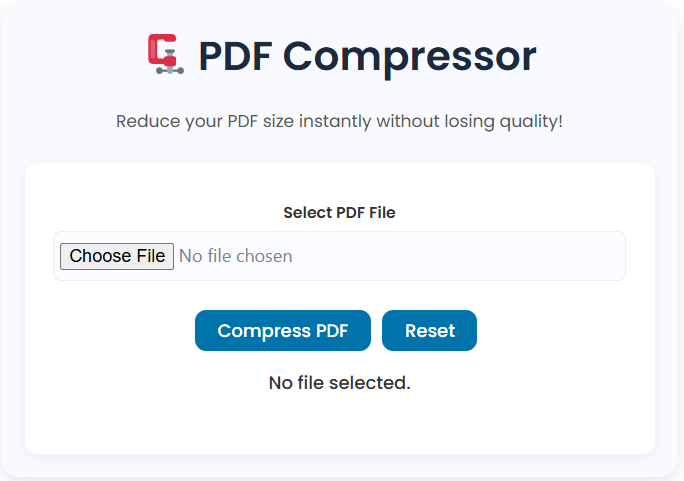
- Go to 👉 toolshub.learntechbytes.com/pdf-compressor-tool/.
- Click “Choose File” and upload your PDF.
- Wait a few seconds while the tool compresses your file.
- Click “Download Compressed PDF” when done.
It’s that easy — no sign-ups, no limits, no ads.
🧩 Common Use Cases for PDF Compression Online Tool
| Use Case | Example |
|---|---|
| Email Attachments | Reduce PDFs to send easily via Gmail or Outlook |
| Job Applications | Upload smaller resume or portfolio PDFs |
| Online Submissions | Compress documents for government or college portals |
| Cloud Storage | Save space in Google Drive or Dropbox |
| Mobile Devices | Free up memory with lighter PDF files |
🔍 Benefits of Compressing PDF Files
⚡ Faster Uploads & Downloads
Smaller PDFs upload faster on websites and cloud platforms.
💾 Save Storage Space
Reduce the load on your device or cloud drive.
📨 Easy Sharing
Avoid “File too large” issues when sending via email or WhatsApp.
🔒 Data Safety
ToolsHub doesn’t upload files anywhere — compression happens locally.
💡 How ToolsHub’s PDF Compression Works
Our tool uses client-side compression powered by lightweight browser algorithms.
That means all operations happen securely within your browser — not on our servers.
Compression includes:
- Image Optimization (reducing DPI & converting formats)
- Font Streamlining (removing unused fonts)
- Metadata Removal (cleaning hidden data)
- Structure Optimization (rebuilding internal structure efficiently)
The result?
Smaller PDF files that retain excellent readability.
Other Tools and Links
Wikipedia – Portable Document Format
🧾 FAQs – PDF Compressor Tool
Is the ToolsHub PDF Compressor Online Tool free?
Yes, 100% free — no limits, no sign-ups, and no hidden charges.
Will my PDF lose quality after compression?
No, the tool is designed to retain text and image clarity while optimizing file structure.
Are my files uploaded to your server?
No, all compression happens directly in your browser — ensuring total data privacy.
How much size reduction can I expect?
Typically between 10% to 80%, depending on the content and image density.
Does it work on mobile devices?
Yes, it works perfectly on Chrome, Safari, or Firefox on any device.
🌟 Why ToolsHub Tools Stand Out
At ToolsHub, every online tool is designed with simplicity and privacy in mind.
From the PDF Merger Tool to the Image to Base64 Converter, our tools aim to make productivity effortless and accessible.
🏁 Final Thoughts
Large PDFs can slow you down, but with ToolsHub’s PDF Compressor Online Tool, you can shrink file sizes instantly — free, secure, and in-browser.
It’s perfect for students, professionals, and business users who want smaller, shareable PDFs without compromising quality.
Start optimizing your documents today at 👉
🔗 toolshub.learntechbytes.com/pdf-compressor-tool/